How to Choose the Right Print Inspection System for Roll-to-Roll Production
In roll-to-roll production, small defects can become big problems very quickly. A printing line can run at high speed, and thousands of meters of film, paper, labels or foil may pass through the machine in a short time. If the operator cannot find problems early, the factory may waste material, time and labor.
A print inspection system helps the production team see defects more clearly and control quality during production. But not every inspection system is suitable for every line. Different materials, speeds, widths and defect types may need different cameras, lights, software and installation methods.
This article explains how to choose the right print inspection system for roll-to-roll production in a simple way.
What Is a Print Inspection System?
A print inspection system is used to check printed materials during or after production. It can help operators find problems such as color difference, missing print, stains, scratches, dots, registration errors, broken text or other visible defects.
In roll-to-roll production, the material moves continuously from one roll to another roll. This is common in many industries, such as flexible packaging, label printing, paper converting, film converting, foil production and nonwoven production.
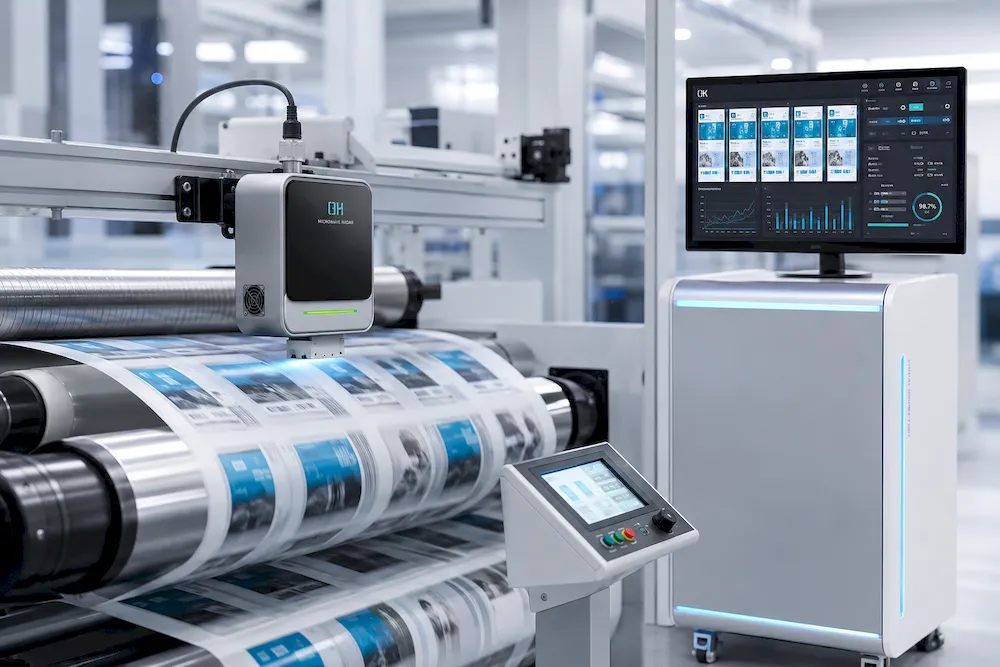
A print inspection system usually includes cameras, lights, sensors, a computer, software and a display screen. Some systems are used mainly to help operators view the print image more clearly. Some systems can inspect the full web automatically and record defect positions.
Understand Your Material First
Before choosing a system, you need to understand your material. This is one of the most important steps.
Different materials reflect light in different ways. A system that works well on paper may not work well on transparent film. A system for printed labels may not be suitable for aluminum foil or glossy laminated material.
Common Roll-to-Roll Materials
Typical materials include:
- Plastic film
- Paper
- Labels
- Aluminum foil
- Nonwoven material
- Laminated material
- Flexible packaging material
If your material is transparent, reflective, very dark, very bright or has a special surface, the inspection system may need special lighting or camera settings. This is why it is better to send material samples, photos or videos before asking for a quotation.
Check the Web Width and Line Speed
Web width and line speed directly affect the system choice.
If the web is very wide, the system may need more cameras or higher-resolution cameras. If the line speed is very high, the system must capture images fast enough. Otherwise, defects may be missed or the image may not be clear.
Key Information to Prepare
Before contacting a supplier, you should prepare the following information:
- Material type
- Web width
- Line speed
- Printing method
- Machine type
- Available installation space
- Expected defect size
- Required inspection level
This information helps the technical team understand whether a simple web inspection system is enough or a more advanced 100% print inspection system is needed.
Know the Defects You Want to Detect
Different factories care about different defects. Some factories mainly want to check large visible problems. Some need to detect very small dots, color changes or missing characters.
Before choosing a print inspection system, you should list the most important defects for your production.
Common Printing Defects
Common defects include:
- Missing print
- Wrong color
- Color difference
- Ink spots
- Scratches
- Dirty marks
- Registration errors
- Broken lines
- Missing labels
- Wrinkles or web movement problems
If possible, prepare real defect samples. Photos and videos are very useful. They help the supplier understand the actual problem instead of guessing.
Choose Between Web Inspection and 100% Print Inspection
Many buyers are not sure about the difference between web inspection and 100% print inspection. These two systems are related, but they are not the same.
Web Inspection System
A web inspection system helps the operator view the printed image more clearly while the machine is running. It can show a stable image on the screen, even when the line speed is high.
This type of system is useful when the operator needs to check printing quality manually. It is often simpler and more cost-effective.
100% Print Inspection System
A 100% print inspection system checks the full web automatically. It uses cameras and software to compare images, detect defects and record defect positions. It can help factories build a more complete quality-control process.
This type of system is suitable when the factory needs automatic defect detection, defect records, traceability and higher inspection accuracy.
Which One Should You Choose?
If you only need better visual monitoring, a web inspection system may be enough. If you need automatic detection and defect records, a 100% print inspection system may be better.
The right choice depends on your material, speed, width, defect type and quality-control target.
Check the Machine Layout and Installation Space
A good print inspection system must fit your production line. Even if the system itself is good, it may not work well if there is not enough space to install cameras, lights and sensors.
Before choosing a system, you should check where the cameras can be installed. You also need to check the web path, roller position, lighting environment and operator position.
Useful Photos to Send
You can send photos of:
- The full machine line
- The printing section
- The rewinding section
- The possible camera position
- The operator control area
- The material running path
Clear photos can reduce communication time and help avoid wrong system selection.
Do Not Ignore Web Guiding and Tension Control
Print inspection does not only depend on the camera. Web stability is also very important.
If the web moves left and right, wrinkles, shakes or has unstable tension, the camera may not see the same area clearly. This can make inspection less reliable.
For this reason, web guiding and tension control are often connected with inspection performance. A stable web helps the inspection system capture a clearer and more consistent image.
If your production line has strong web movement or tension changes, you may need to solve these problems before or together with the inspection project.
Think About Software and Data Records
Software is another important part of the system. Some users only need a live image display. Others need defect classification, data storage, reports and traceability.
For higher quality-control requirements, the software should be easy to use and suitable for daily factory operation. Operators should be able to understand the interface quickly. The system should also help the factory find defect positions and review quality records when needed.
Useful Software Functions
Useful functions may include:
- Live image display
- Defect detection
- Defect alarm
- Defect position record
- Image saving
- Production data report
- Historical data query
- Simple operation interface
You do not always need the most complex software. You need software that matches your real production process.
Prepare the Right Information Before Asking for a Quotation
Many buyers ask for a price before giving technical details. This often leads to inaccurate quotations.
A model name or product photo is not enough. For inspection projects, the supplier needs to understand the application first. The more information you provide, the easier it is to recommend a suitable system.
Basic Inquiry Checklist
Before asking for a quotation, prepare:
- Material type
- Web width
- Line speed
- Machine type
- Printing process
- Defect samples
- Sample photos or videos
- Required inspection accuracy
- Installation position photos
- Quality-control target
This checklist can help both sides save time and reduce misunderstanding.
Conclusion
Choosing the right print inspection system for roll-to-roll production is not only about choosing a machine. It is about understanding the full application.
You need to check the material, web width, line speed, defect type, machine layout, installation space and quality-control target. You also need to decide whether you need simple web inspection or a full 100% print inspection system.
A suitable system can help your production team find defects earlier, reduce waste and improve quality control. But the wrong system may bring extra cost and poor results.
Before making a decision, prepare clear technical information and discuss your real production needs. This will make the selection process easier, more accurate and more useful for long-term production.